
Step 1. Complete the Application
Click the button below to apply for membership.
 Wait until you receive an email that your application is approved before going to Step 2!
Step 2: Pay Membership Dues
Please pay your annual membership fee of $120.
If you pay and are not approved as a member we consider this a donation.
Thank you.
Step 3: Register to Create Member Profile
Approved and Paid Summit Club Members Only!
Complete the Profile Registration Form.
This will add your information to our Membership system.
REGISTRATION REQUIRES MANUAL APPROVAL (because of malware bots). It should not take too long.
After you are approved you can LOG IN and will have access to the MEMBER PORTAL and Member Directory menu options.
If you have questions, send them to the Web Monkey at: vp-is-services@summitclub.org
Click the REGISTER NOW button below to get started.
Notice: If you have registered/logged in but do not see the additional Membership menu information, you are NOT SIGNED IN.
You are likely signing in from a different computer or browser. Click the button below to login.

Step 4: Log In In And Update Your Profile Picture
Click the Log In button above or click LOGIN from the top menu
Notice: If you do not see the additional Membership menu information, you are NOT LOGGED IN.
You may be signing in from a different computer or browser. Click the Log In button above.
This is what the top menu looks like when you are logged in from a laptop or desktop device.

Top Menu on a Mobile Device
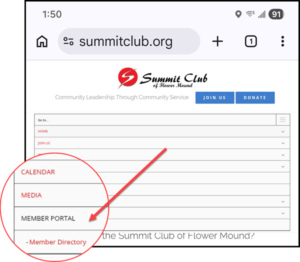
a) Click on the Member Directory
b) Find your profile
c) Click the Edit Profile button
d) Click on the picture with the white camera
e) Upload a picture of YOUR smiling face
(NO avatars or pictures of Brad Pitt)
If you have problems, send your picture to the Web Monkey at
vp-is-services@summitclub.org
Following Are Additional Things We Would Like
New Summit Club Members To Do
a) Join the Summit Club Facebook Members Only page
b) Follow the Summit Club Public Page
c) Follow the Summit Club Smoke & Whiskey Fest Page
This is our big fundraising event.
d) Bookmark the Summit Club Home Page
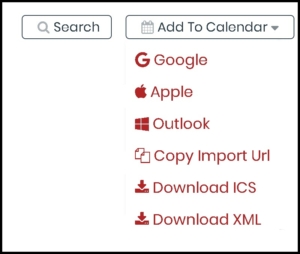
e) Add the Summit Club Calendar to your personal calendar
Click the drop-down to Add To Calendar and select your personal calendar.